# Wireframe Peeking Through
**URL:** https://forum.highend3d.com/t/wireframe-peeking-through/42317
**Category:** Maya
**Tags:** new-user
**Created:** [May 16, 2008, 12:41pm UTC](https://forum.highend3d.com/t/wireframe-peeking-through/42317 "2008-05-16T12:41:29Z")
**Posts on this page:** 4
**Page:** 1
### Author:  [@jmatasov](https://forum.highend3d.com/u/jmatasov)
#### Post date: [May 16, 2008, 12:41pm UTC](https://forum.highend3d.com/t/wireframe-peeking-through/42317/1 "2008-05-16T12:41:29Z")
Hello - I have a newbie question. I am relatively new to Maya 2008, and must have set a setting somewhere that is causing a strange (to me) result in the Perspective View. It is happening only in the perspective view. I am running it on Windows XP Pro.
Here's an example:
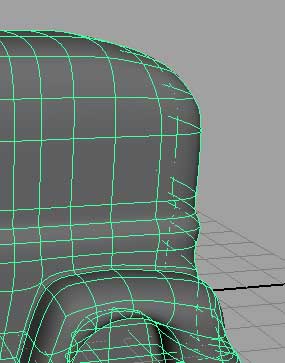
See how the wireframe (and parts of the shade) are "peeking" through the back? I would like to turn that off.
In the panel menu, the following shading settings are set:
Shading -\> Smooth Shade All - Checked
Shading -\> Wireframe on Shaded - Checked
Shading -\> Backface Culling - Checked
Everything else on the Shading menu is unchecked.
The wireframe didn't used to poke through like that. I used to see only the parts of the wireframe that would normally be visible from the camera's angle. It's also worth noting that this happens only in the perspective view. All other views are normal, so it's definitely a setting I set somewhere.
Any help would be greatly appreciated! ![]()
---
### Author:  [@joojaa](https://forum.highend3d.com/u/joojaa)
#### Post date: [May 17, 2008, 7:22am UTC](https://forum.highend3d.com/t/wireframe-peeking-through/42317/2 "2008-05-17T07:22:28Z")
Looks like gfx card clip precision thing. bring the clipping planes closer. Alternatively the object is scaled way much at some point causing normals to barf out.
But yes due to thwe way it works its perfectly understandable effect.
---
### Author:  [@jmatasov](https://forum.highend3d.com/u/jmatasov)
#### Post date: [May 17, 2008, 11:30am UTC](https://forum.highend3d.com/t/wireframe-peeking-through/42317/3 "2008-05-17T11:30:12Z")
You are right! Thank you! as an FYI to anyone else who runs into this, I had set the Panel View Menu -\> Camera Attribute Editor -\> Near Clip Plane to 0.000. Changing that value to 0.001 fixed the error. I am sure it has something to do with the math used to figure out what the camera can and cannot see, and my guess is that if it's set to 0.000 many of the equations just won't work.
Thanks again! ![]()
---
### Author:  [@joojaa](https://forum.highend3d.com/u/joojaa)
#### Post date: [May 17, 2008, 12:59pm UTC](https://forum.highend3d.com/t/wireframe-peeking-through/42317/4 "2008-05-17T12:59:58Z")
When the computer darws stuff on screen it does not draw the things in any specifically sane order. it uses a z buffer to decide what iasi n front and what is not. Now the zbuffer has a precicion so the distance between clip planes is important for fidelity as its used to decide whats in front and whats behind.